What does the --save option for npm install mean?
Before version 5, NPM simply installed a package under node_modules by default. When you were trying to install dependencies for your app/module, you would need to first install them, and then add them (along with the appropriate version number) to the dependencies section of your package.json.
The --save option instructed NPM to include the package inside of the dependencies section of your package.json automatically, thus saving you an additional step.
In addition, there are the complementary options --save-dev and --save-optional which save the package under devDependencies and optionalDependencies, respectively. This is useful when installing development-only packages, like grunt or your testing library.
It won't do anything if you don't have a package.json file. Start by running npm init to create one. Then calls to npm install --save or npm install --save-dev or npm install --save-optional will update the package.json to list your dependencies.
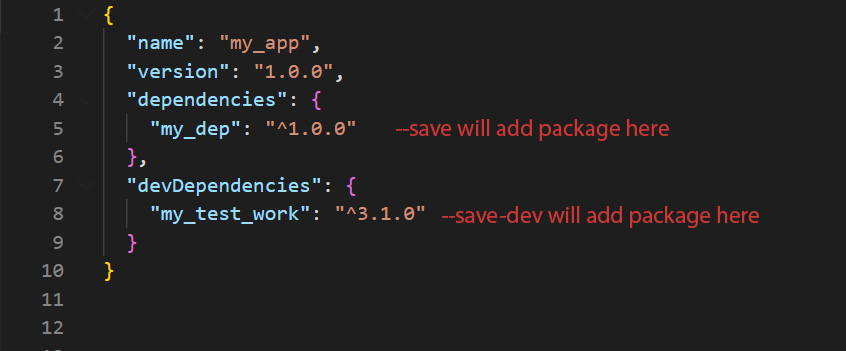
As of npm 5.0.0, installed modules are added as a dependency by default, so the --save option is no longer needed. The other save options still exist and are listed in the documentation for npm install.
That's all for now. Thank you for reading and I hope this post will be helpful :)